
SQL Joins (Inner, Left, Right and Full Join)
SQL Join operation combines data or rows from two or more tables based on a common field between them.
In this article, we will learn about Joins in SQL, covering JOIN types, syntax, and examples.
SQL JOIN
SQL JOIN clause is used to query and access data from multiple tables by establishing logical relationships between them. It can access data from multiple tables simultaneously using common key values shared across different tables.
We can use SQL JOIN with multiple tables. It can also be paired with other clauses, the most popular use will be using JOIN with WHERE clause to filter data retrieval.
SQL JOIN Example
Consider the two tables below as follows:
Student:

StudentCourse :

Both these tables are connected by one common key (column) i.e ROLL_NO.
We can perform a JOIN operation using the given SQL query:
SELECT s.roll_no, s.name, s.address, s.phone, s.age, sc.course_id
FROM Student s
JOIN StudentCourse sc ON s.roll_no = sc.roll_no;
Output:
| ROLL_NO | NAME | ADDRESS | PHONE | AGE | COURSE_ID |
| 1 | HARSH | DELHI | XXXXXXXXXX | 18 | 1 |
| 2 | PRATIK | BIHAR | XXXXXXXXXX | 19 | 2 |
| 3 | RIYANKA | SILGURI | XXXXXXXXXX | 20 | 2 |
| 4 | DEEP | RAMNAGAR | XXXXXXXXXX | 18 | 3 |
| 5 | SAPTARHI | KOLKATA | XXXXXXXXXX | 19 | 1 |
Types of JOIN in SQL
There are many types of Joins in SQL. Depending on the use case, you can use different type of SQL JOIN clause.
Here are the frequently used SQL JOIN types:
Table of Content
SQL INNER JOIN
The INNER JOIN keyword selects all rows from both the tables as long as the condition is satisfied. This keyword will create the result-set by combining all rows from both the tables where the condition satisfies i.e value of the common field will be the same.
Syntax:
The syntax for SQL INNER JOIN is:
SELECT table1.column1,table1.column2,table2.column1,....
FROM table1
INNER JOIN table2
ON  table1.matching_column = table2.matching_column;
Here,
- table1: First table.
- table2: Second table
- matching_column: Column common to both the tables.
Note: We can also write JOIN instead of INNER JOIN. JOIN is same as INNER JOIN.

INNER JOIN Example
Let’s look at the example of INNER JOIN clause, and understand it’s working.
This query will show the names and age of students enrolled in different courses.
SELECT StudentCourse.COURSE_ID, Student.NAME, Student.AGE FROM Student
INNER JOIN StudentCourse
ON Student.ROLL_NO = StudentCourse.ROLL_NO;Output:

SQL LEFT JOIN
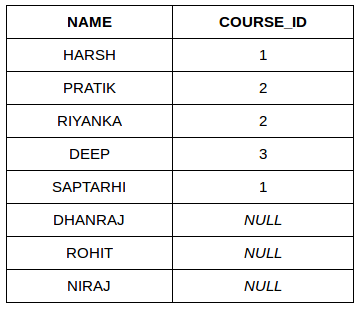
LEFT JOIN returns all the rows of the table on the left side of the join and matches rows for the table on the right side of the join. For the rows for which there is no matching row on the right side, the result-set will contain null. LEFT JOIN is also known as LEFT OUTER JOIN.
Syntax:
The syntax of LEFT JOIN in SQL is:
SELECT table1.column1,table1.column2,table2.column1,....
FROM table1
LEFT JOIN table2
ON table1.matching_column = table2.matching_column;
Here,
- table1: First table.
- table2: Second table
- matching_column: Column common to both the tables.
Note: We can also use LEFT OUTER JOIN instead of LEFT JOIN, both are the same.

LEFT JOIN Example
Let’s look at the example of LEFT JOIN clause, and understand it’s working
SELECT Student.NAME,StudentCourse.COURSE_ID
FROM Student
LEFT JOIN StudentCourse
ON StudentCourse.ROLL_NO = Student.ROLL_NO;Output:
SQL RIGHT JOIN
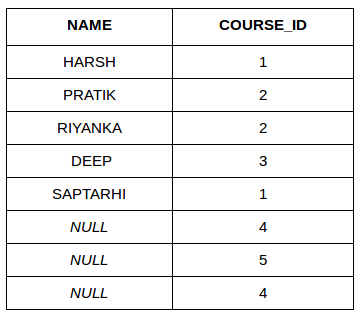
RIGHT JOIN returns all the rows of the table on the right side of the join and matching rows for the table on the left side of the join.It is very similar to LEFT JOIN For the rows for which there is no matching row on the left side, the result-set will contain null. RIGHT JOIN is also known as RIGHT OUTER JOIN.
Syntax:
The syntax of RIGHT JOIN in SQL is:
SELECT table1.column1,table1.column2,table2.column1,....
FROM table1
RIGHT JOIN table2
ON table1.matching_column = table2.matching_column;
Here,
- table1: First table.
- table2: Second table
- matching_column: Column common to both the tables.
Note: We can also use RIGHT OUTER JOIN instead of RIGHT JOIN, both are the same.

RIGHT JOIN Example:
Let’s look at the example of RIGHT JOIN clause, and understand it’s working
SELECT Student.NAME,StudentCourse.COURSE_ID
FROM Student
RIGHT JOIN StudentCourse
ON StudentCourse.ROLL_NO = Student.ROLL_NO;
Output:
SQL FULL JOIN
FULL JOIN creates the result-set by combining results of both LEFT JOIN and RIGHT JOIN. The result-set will contain all the rows from both tables. For the rows for which there is no matching, the result-set will contain NULL values.

Syntax
The syntax of SQL FULL JOIN is:
SELECT table1.column1,table1.column2,table2.column1,....
FROM table1
FULL JOIN table2
ON table1.matching_column = table2.matching_column;
Here,
- table1: First table.
- table2: Second table
- matching_column: Column common to both the tables.
FULL JOIN Example
Let’s look at the example of FULL JOIN clause, and understand it’s working
SELECT Student.NAME,StudentCourse.COURSE_ID
FROM Student
FULL JOIN StudentCourse
ON StudentCourse.ROLL_NO = Student.ROLL_NO;
Output:
NAME | COURSE_ID |
|---|---|
HARSH | 1 |
PRATIK | 2 |
RIYANKA | 2 |
DEEP | 3 |
SAPTARHI | 1 |
DHANRAJ | NULL |
ROHIT | NULL |
NIRAJ | NULL |
NULL | 4 |
NULL | 5 |
NULL | 4 |
SQL Natural join (?)
Natural join can join tables based on the common columns in the tables being joined. A natural join returns all rows by matching values in common columns having same name and data type of columns and that column should be present in both tables.
Both table must have at least one common column with same column name and same data type.
The two table are joined using Cross join.
DBMS will look for a common column with same name and data type Tuples having exactly same values in common columns are kept in result.
Natural join Example:
Look at the two tables below- Employee and Department
Employee | ||
|---|---|---|
| Emp_id | Emp_name | Dept_id |
| 1 | Ram | 10 |
| 2 | Jon | 30 |
| 3 | Bob | 50 |
Department | |
|---|---|
| Dept_id | Dept_name |
| 10 | IT |
| 30 | HR |
| 40 | TIS |
Problem: Find all Employees and their respective departments.
Solution Query: (Employee) ? (Department)
| Emp_id | Emp_name | Dept_id | Dept_id | Dept_name |
|---|---|---|---|---|
| 1 | Ram | 10 | 10 | IT |
| 2 | Jon | 30 | 30 | HR |
| Employee data | Department data | |||
Comments
Post a Comment